
From Internal Tool to Ticketing Platform
A US event organiser was tired of handing commissions to Ticketmaster and fighting with outdated organiser dashboards. He came to us for a simple internal tool. Five weeks in, he had a decision to make - and he went bigger.
Why Event Organisers Build Their Own Ticketing Software
Our client had been running events across the US for years, and like most independent organisers, he was entirely dependent on the big platforms. Ticketmaster, VBO Tickets, and Eventbrite all got the job done - but each one came with the same set of frustrations: per-ticket commissions that compounded with every sale, organiser interfaces that felt like they hadn't been updated since 2008, and navigation flows complex enough to make a simple task feel like a chore.
The platforms were designed for the platforms, not for him. He was producing the events, filling the seats, and doing the hard work - but a meaningful cut of every ticket went elsewhere.
He came to Esseal with a straightforward brief: our full-stack development team would build an internal organiser dashboard so he could manage his own events without touching a third-party platform.
The Week 5 Pivot
What started as internal tooling became something else entirely.
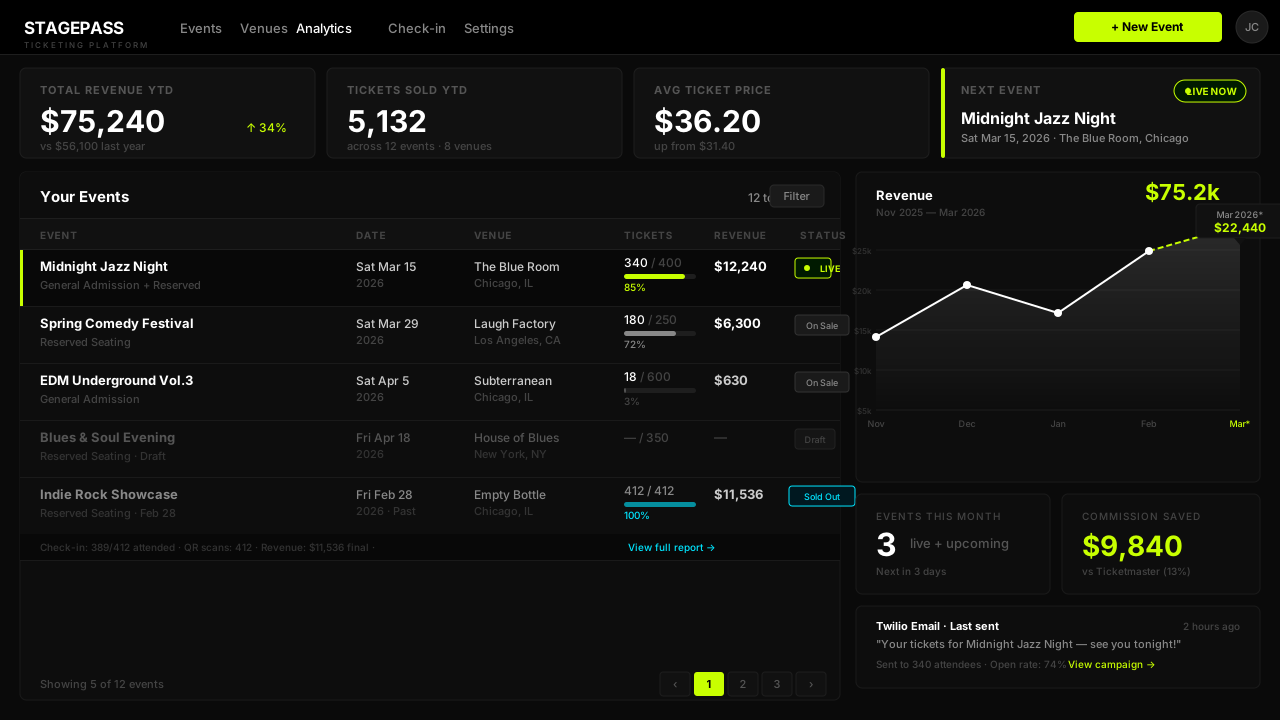
- Phase 1 - The Organiser Dashboard We built a clean, modern organiser dashboard on Rails and React with a GraphQL API. Event creation, attendee management, basic analytics. Fast to navigate, nothing unnecessary. The client started using it for his own events immediately.
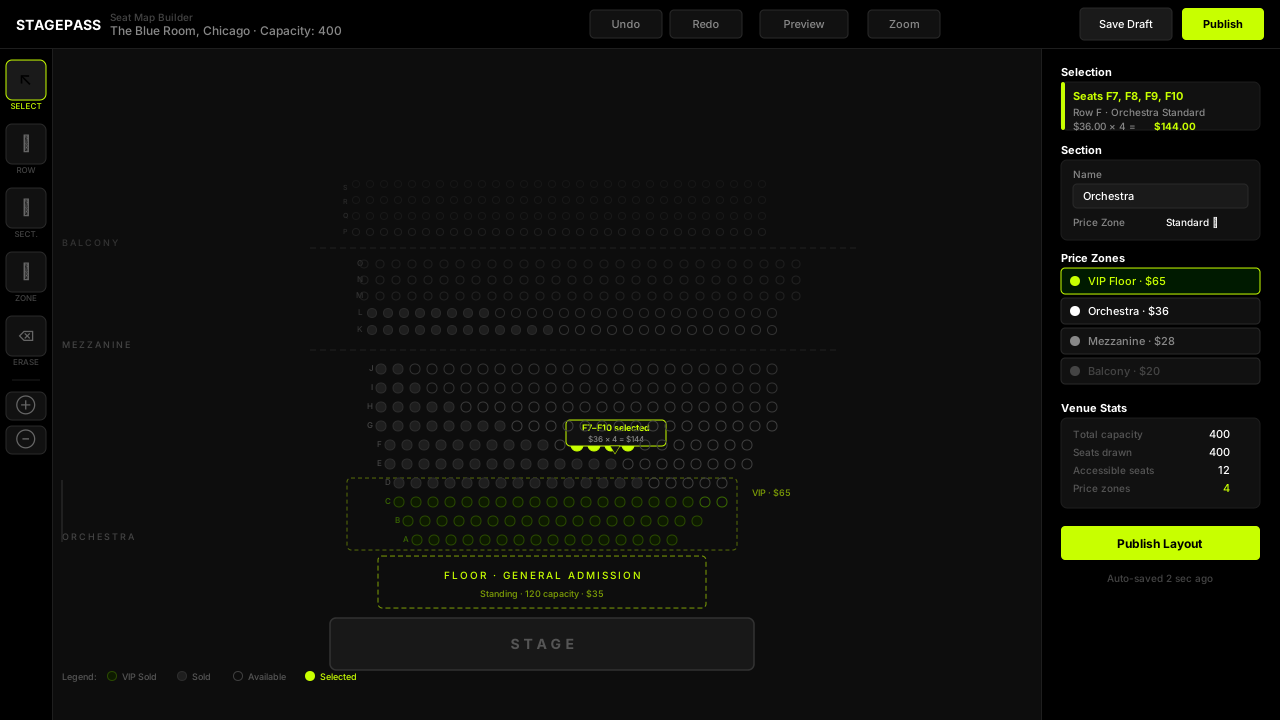
- Phase 2 - The Seat Map Builder The original brief didn't include this. But once the dashboard was running, the obvious next question was: how do we handle assigned seating? We built a custom venue and seat map builder from scratch in vanilla JS - no dependencies, no third-party libraries. Complex enough to model any layout. Simple enough that a non-technical organiser could build one in minutes.
- Week 5 - The Decision With Phase 1 live and Phase 2 in progress, the client could see the full picture. He had the core of a proper ticketing platform - one that did everything Ticketmaster did but without the commissions and without the outdated UX. He decided to go the distance. We scoped Phase 3.
- Phase 3 - The Full Platform Admin dashboard. A check-in manager app for door staff with QR code scanning and JWT auth. A public-facing ticket sales site for attendees - built on Rails SSR, fast to load, straightforward to buy from. Transactional emails via Twilio. Deployed on DigitalOcean behind Cloudflare.
The Hard Parts
Two problems that had no obvious off-the-shelf solution.
The Seat Map Builder
Existing venue builders are either too rigid or too complex for non-technical users. We built ours from scratch in vanilla JS - zero dependencies, no third-party library constraints. It needed to handle curved rows, accessible sections, split pricing zones, and irregular layouts, while remaining usable by someone who has never touched a technical tool in their life. The constraint of "a non-technical 50-year-old should be able to use this without a tutorial" drove every design decision.
Analytics Without the Noise
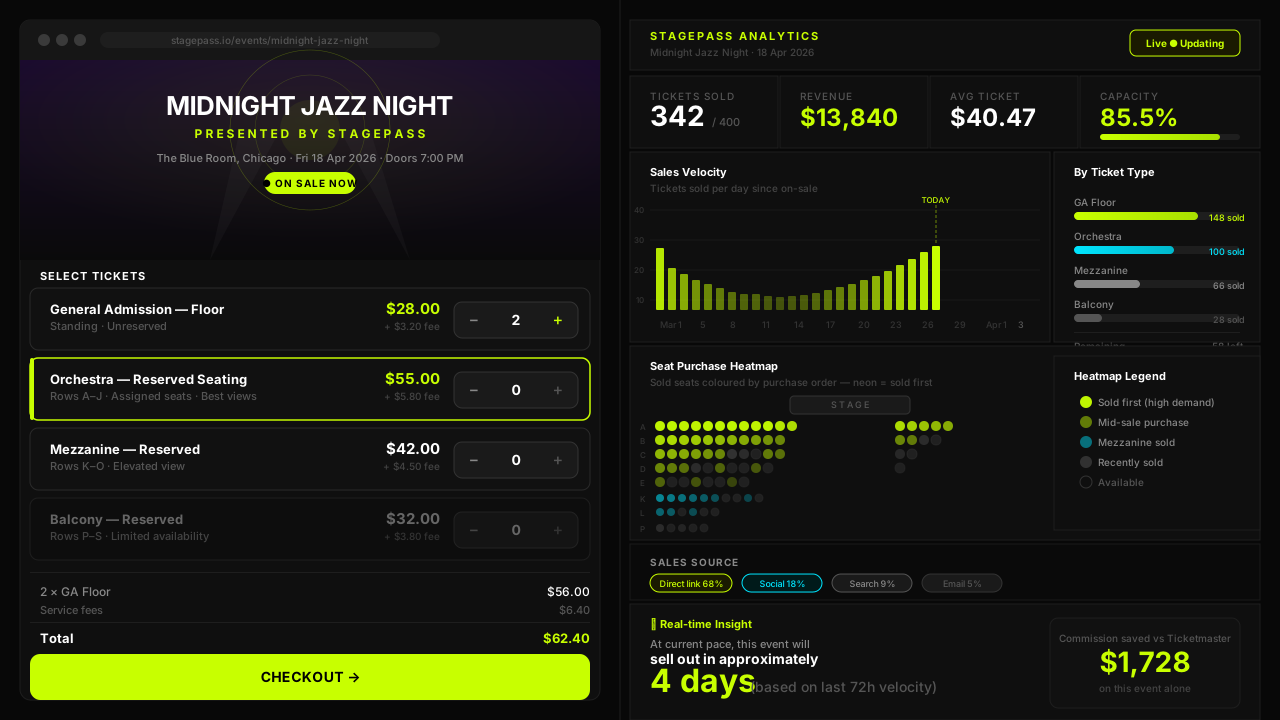
The client wanted seat heatmaps showing which seats sell out fastest, user segmentation, and per-event and per-ticket stats. Building the analytics infrastructure was straightforward. The challenge was presenting it in a way that didn't require interpretation - where every number is immediately obvious and actionable without needing a dashboard walkthrough. Extreme simplicity at the surface, with the full complexity living underneath.
Full-Stack Event Ticketing Platform - What We Built
Five applications. One platform.
- Organiser Dashboard: Full event management - create events, manage attendees, monitor sales, view analytics.
- Seat Map Builder: Drag-and-drop venue layout tool built entirely in vanilla JS. Any layout, any complexity, zero dependencies.
- Admin Dashboard: Platform-level controls, user management, and oversight tools.
- Check-In Manager: Mobile-friendly door staff app with QR code scanning, real-time check-in status, and JWT authentication.
- Ticket Sales Site: Public-facing attendee experience - browse events, pick seats, buy tickets. Rails SSR for fast initial load.
The Outcome
The platform went live in November 2025. In its first months of operation - with the client hosting exclusively his own events - it processed over 5,000 tickets across 12 events at 8 onboarded venues.
The client no longer pays commissions to Ticketmaster. He owns the platform, controls the user experience end-to-end, and has a system that can onboard other organisers when he's ready to open it up.
What began as a request to build one internal dashboard became a fully independent ticketing platform - built from scratch, live in production, and already processing real events and real sales. A textbook example of product development that starts focused and expands when the opportunity is right.
Frequently Asked Questions
Can you build a custom ticketing platform from scratch?
Yes. This case study is a live example. Esseal built a full-stack event ticketing platform from scratch - organiser dashboard, venue seat map builder, check-in manager, admin panel, and public ticket sales site. The platform launched in November 2025 and has processed over 5,000 tickets across 12 events at 8 venues.
How long does it take to build a ticketing platform?
The core organiser dashboard was functional within the first few weeks. The full platform - including the seat map builder, check-in app, admin dashboard, and public sales site - was live within a few months of the initial brief. Timeline varies based on scope, but our full-stack development process is built for speed without sacrificing code quality.
What tech stack do you use for event management software?
For this project: Ruby on Rails backend with a GraphQL API, React for all dashboard frontends, vanilla JavaScript for the custom seat map builder (zero dependencies), Rails SSR for the public ticket sales site, DigitalOcean hosting, Cloudflare CDN, and Twilio for transactional emails.
Do I need to commit to a full platform upfront, or can we start smaller?
You don't need to commit to anything beyond your first phase. This project started as a single organiser dashboard. The client only decided to expand to a full platform once he could see what was possible. We scope and build incrementally - you pay for what you need, when you need it.
Have a Product Idea? Let's Build It.
Whether you're starting with a simple internal tool or planning a full platform, our senior engineers will get you to launch fast - and build it right the first time.